
What Are Documents in Good Solutions?
Documents make it easy to connect important production information to the people and equipment that need it.
In manufacturing, operators frequently need access to work instructions, quality specifications, safety procedures, setup guides, and other supporting documentation.
Good Solutions brings these resources closer to daily production by making them accessible through Operator Tools, Articles and Orders.
Instead of searching through folders or separate systems, operators can access relevant documentation directly from their production environment.
How Do Documents Work?
Good Solutions uses links to existing documents rather than uploading and storing document files.
This means your organization can continue managing its documentation in existing systems, such as SharePoint, document management systems, or other shared repositories.
Good Solutions provides a convenient way to access those documents in the context of production.
For example, a quality inspection instruction stored in SharePoint can be linked to a particular Article. When an operator works with that Article, the document can be accessed through Operator Tools.
This approach helps organizations maintain a central source of documentation while making the information easier to find.
Connecting Documents to Production
Documents can be associated with different parts of your production environment.
| Association | Purpose |
|---|---|
| Measure Point | Make documentation available for a specific machine or production line |
| Article | Connect instructions or specifications to a particular product |
| Order | Provide documentation relevant to a specific production order |
| Category | Organize documents and make them easier to find |
A document can therefore be made relevant to the equipment being used, the product being manufactured, or the order being executed.
Example: Product-Specific Work Instructions
A factory manufactures several different products on the same production line.
Each product requires a different setup procedure.
By associating the correct setup instructions with each Article, operators can access the relevant instructions when working with that product.
This reduces the need to search manually and helps prevent mistakes caused by using outdated or incorrect instructions.
Where Can Operators Access Documents?
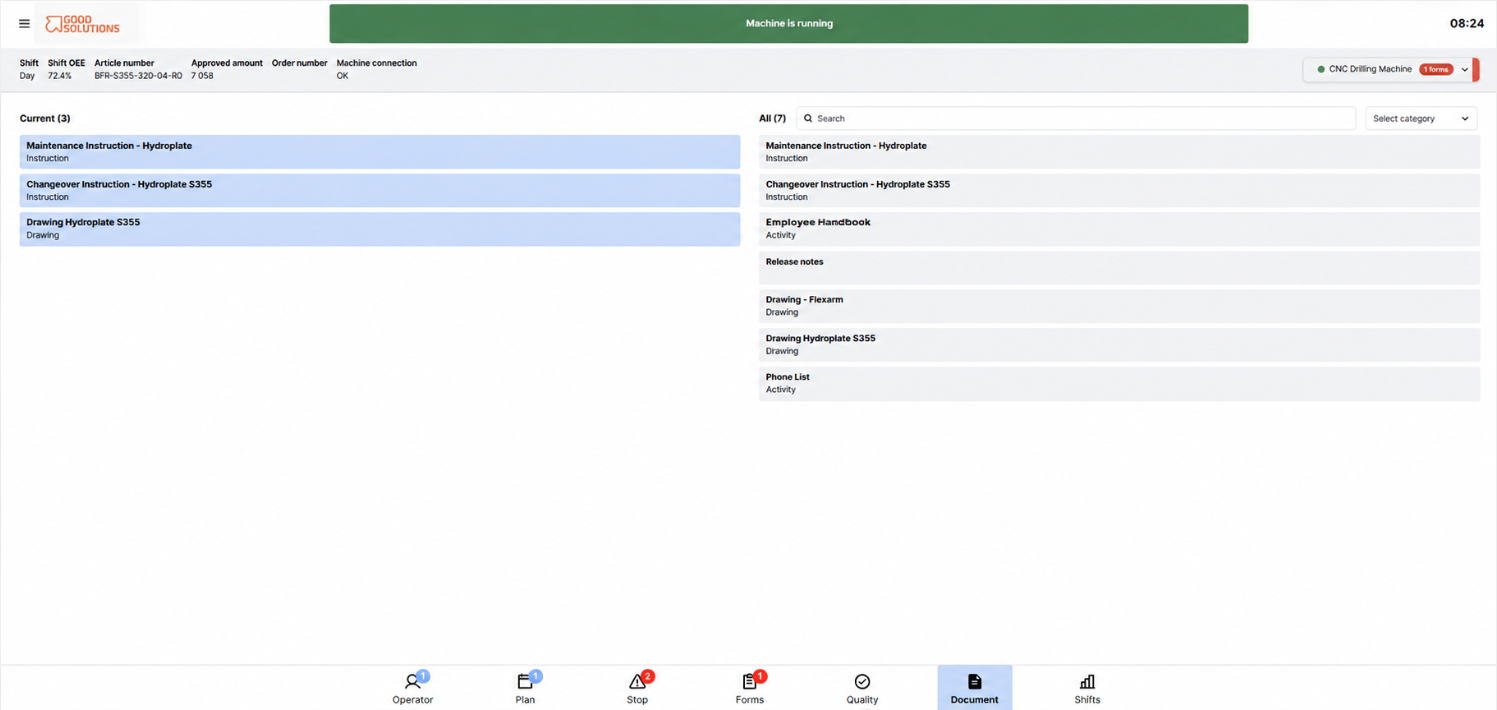
Current Documents in Operator Tools
The Current Documents view provides access to documentation associated with the current production context, such as the Article or Order being produced.
This is particularly useful when operators need product-specific instructions during production.
All Documents in Operator Tools
The All Documents view provides access to documentation associated with the selected Measure Point.
This can include general machine instructions, maintenance procedures, and other resources that operators may need regardless of which Article is being produced.
Production Plan
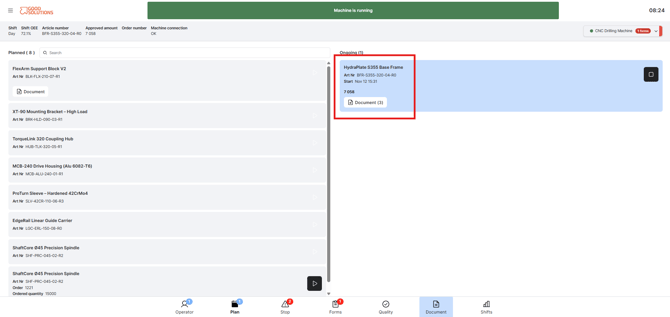
Documents associated with Articles or Orders can also be accessed from the Production Plan.
A document icon indicates that relevant documentation is available.
This allows operators to review instructions before starting or while preparing for production.
Examples of Documents
Common examples include:
- Work instructions: Step-by-step instructions for manufacturing a product.
- Quality specifications: Requirements and acceptance criteria for finished products.
- Setup instructions: Procedures for preparing equipment for a particular Article.
- Safety procedures: Instructions for working safely with equipment.
- Maintenance instructions: Guidance for routine equipment maintenance.
- Standard Operating Procedures (SOPs): Standardized instructions for recurring activities.
Documents and Forms
Documents and Forms complement each other in Good Solutions.
Documents provide instructions and reference information.
Forms allow operators to record information, complete checks, and document results.
For example, an operator might open a linked inspection instruction to understand how to perform a quality check, then complete a Good Solutions Form to record the inspection results.
Together, these features support standardized work, quality control, and traceability.
Benefits of Using Documents
Using Documents in Good Solutions helps organizations:
- Make information easier to find: Operators can access documentation directly from their production environment.
- Reduce mistakes: Relevant instructions are available when they are needed.
- Support standardized work: Teams can follow consistent procedures across machines and shifts.
- Improve quality: Product-specific specifications and instructions are easier to access.
- Maintain existing document systems: Files remain in their original repositories rather than being duplicated in Good Solutions.
Key Takeaways
- Good Solutions provides links to existing documents rather than storing uploaded files.
- Documents can be associated with Measure Points, Articles, Orders, and Categories.
- Operators can access relevant documentation through Operator Tools and the Production Plan.
- Documents can also be included in Dashboards.
- Documents provide instructions, while Forms help capture completed checks and results.